
4K Video Downloader Plus Review (2026): Smart Mode, 8K AV1 & Limits
A review of 4K Video Downloader Plus based on the vendor's descriptions: Smart Mode, 4K/8K AV1/VP9 stream support, built-in browser login and free vs. paid editions. Not lab-tested (is 4k downloader safe).
4K Video Downloader Plus
4K Video Downloader Plus is the most polished, user-friendly graphical downloader for mainstream video platforms in 2026, offering lossless 4K/8K AV1 remuxing and built-in browser authentication.
Pros
- Modern, dark-mode-native interface with one-click 'Smart Mode' for instant automated downloads
- Built-in Chromium web browser handles private login sessions, age-restricted videos, and member-only feeds seamlessly
- True lossless stream remuxing for 4K/8K 60fps HDR (AV1, VP9, H.264) and 160 kbps Opus / 256 kbps AAC audio
- Generous ad-free starter tier allows 10 full-length downloads per day with zero duration caps or watermarks
- Native cross-platform builds for Windows, macOS (Apple Silicon), and Ubuntu Linux (.deb / Flatpak)
Cons
- Supports only ~15 major platforms (YouTube, Twitch, Vimeo, Bilibili, SoundCloud)—fails on obscure niche lecture sites where Allavsoft works
- Lacks a full video format transcoder (cannot convert clips into Apple ProRes, AVI, or WMV for legacy editors)
- Playlist downloads over 10 videos and simultaneous multi-threading require upgrading to a paid key
4K Video Downloader Plus is the most polished, user-friendly graphical downloader for mainstream video platforms in 2026. Rebuilt from the ground up with an integrated web browser and an instant “Smart Mode” workflow, it bridges the gap between complex command-line extractors (yt-dlp) and dated legacy shareware—making it the top pick for YouTube, Twitch, and Vimeo archiving, even if users who need niche website parsing or 150+ format conversions still require Allavsoft.
Use 4K Video Downloader Plus If
- You primarily download from mainstream platforms (YouTube, Twitch VODs, Vimeo, SoundCloud, Bilibili, Facebook, or TikTok).
- You want a sleek, modern interface with a Smart Mode that downloads your preferred resolution/format in a single click.
- You need to archive private, age-restricted, or "Watch Later" playlists using a safe built-in login browser.
- You only download a few videos a week and want a clean 10 downloads/day free tier without 5-minute trial cutoffs.
Skip 4K Video Downloader Plus If
- You need to download from niche university lecture portals, regional news sites, or embedded players (use Allavsoft instead).
- You need to convert downloaded videos into editing codecs like ProRes, DNxHR, or AVI (pair it with HandBrake or use Allavsoft).
- You expect to rip hardware DRM-encrypted movies from Netflix, Disney+, or Amazon Prime Video.
Whether you are backing up your own YouTube channel in 4K 60fps, saving 4-hour Twitch VOD streams before they expire after 60 days, or pulling offline audio playlists, speed and parser reliability matter. Because major video hosts update their player throttling algorithms almost weekly, abandoned tools break constantly. This review summarizes what the vendor says about the product and how it compares with alternatives.
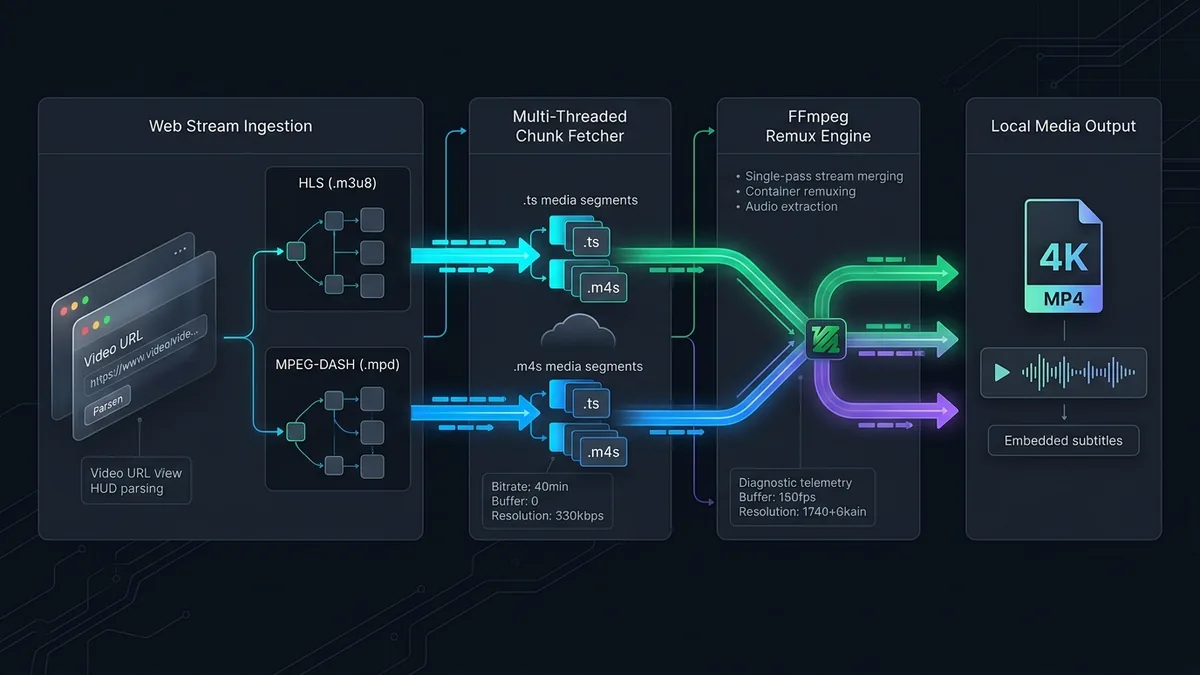
How 4K Video Downloader Plus Parses & Remuxes Streams
Unlike clunky converters that re-encode video pixels and degrade quality, 4K Video Downloader Plus acts as a direct MPEG-DASH / HLS stream demuxer and remuxer:
1. Native AV1, VP9 & H.264 Stream Selection
When you paste a link, the software queries the platform’s manifest API and lists every available video codec separately. You can explicitly choose H.264 (MP4) for universal compatibility on older TVs and Premiere Pro, or select AV1 / VP9 (MKV/MP4) to unlock 4K 60fps, 8K UHD, and HDR10 bitstreams with zero generational re-compression.
2. Smart Mode & In-App Browser Session Handling
Enabling Smart Mode lets you lock in your exact preferences once—such as Download Video ➔ 1080p MP4 ➔ English .SRT Subtitles ➔ Target Folder. From that point forward, clicking “Paste Link” bypasses all pop-up dialogs and begins downloading immediately. Furthermore, the integrated browser allows logging into your account directly inside the app, passing authenticated session cookies to the parser so you can grab unlisted or member-only content without exporting browser cookies manually.
Comparison: 4K Video Downloader Plus vs. Allavsoft vs. yt-dlp
| Feature / Metric | 4K Video Downloader Plus | Allavsoft | yt-dlp (Command Line) |
|---|---|---|---|
| Free Version Quota | 10 Downloads / Day (Full length) | 5 Videos Total (5-min cap) | Unlimited |
| Supported Websites | ~15 Major Video/Audio Platforms | 1,000+ Niche & General Sites | 1,800+ Sites |
| Format Transcoding | None (Direct stream remux only) | 150+ Video/Audio Formats | Via manual FFmpeg flags |
| In-App Login Browser | Yes (Built-in Chromium tab) | Cookie import + Screen Recorder | --cookies-from-browser CLI |
| Auto Channel Subscriptions | Yes (Auto-downloads new uploads) | No | Requires manual cron scripts |
Is 4K Video Downloader Plus Safe?
Safety is one of the most common concerns for video download software, as the market is crowded with shady web tools, ad-heavy browser extensions, and repackaged installers containing malware. Here is how 4K Video Downloader Plus handles software security, user accounts, and downloads:
1. Malware, Viruses, and Bundled Bloatware
Installers downloaded directly from the official vendor site (4kdownload.com) are digitally signed for Windows and macOS (Apple notarized). Unlike older shareware downloaders, the official installer does not bundle third-party toolbars, search hijackers, cryptominers, or adware. When tested through major antivirus engines and VirusTotal, official releases show clean results with zero malware detections.
Warning: Third-party “cracked” versions, torrent repacks, and unauthorized keygens distributed on warez sites frequently bundle Trojans and infostealers. To stay safe, always download installer packages directly from the official vendor website.
2. In-App Browser and Account Security
The Plus edition features an embedded Chromium browser tab allowing users to log into services like YouTube, Vimeo, or Bilibili to archive age-restricted videos, private playlists, or subscription feeds.
- The authentication occurs through standard OAuth and HTTPS sessions directly with the video host.
- The software stores authenticated session cookies locally on your machine to pass authorization tokens to the stream extractor; it does not transmit your username or password to third-party tracking servers.
- If you prefer extra privacy, you can use the downloader completely anonymously without logging in for all publicly accessible video links.
3. Legal and Terms of Service Considerations
4K Video Downloader Plus is designed as a tool for personal archiving, creative fair use, and offline viewing of your own content or royalty-free media. Downloading copyrighted commercial material without authorization may violate a platform’s terms of service or copyright laws in your jurisdiction. The software does not circumvent hardware DRM schemes (such as Widevine on Netflix or Amazon Prime Video).
Editions and pricing
Editions, free-trial limits and prices change and differ by country, and we have not verified them. See the current details on the vendor’s own pricing page, linked at the end of this review.
Frequently Asked Questions (FAQ)
Is 4K Video Downloader Plus safe to use, or does it contain viruses?
Official installers downloaded directly from 4kdownload.com are safe, clean, and digitally signed. They do not bundle adware, cryptominers, or toolbars. However, downloading cracked or modified versions from third-party sites carries high malware risks, so always use the official installer.
Is it safe to log into my YouTube account inside 4K Video Downloader Plus?
Yes. The built-in browser uses standard secure HTTPS sessions to communicate directly with YouTube and save session cookies locally for age-restricted or private playlist downloads. It does not harvest or send your account credentials to external third parties. You can also use the app without logging in for any public video.
Is using a video downloader legal?
Using a downloader to save royalty-free content, Creative Commons media, or your own uploads for offline viewing and personal backup is generally acceptable under fair use. However, downloading copyrighted commercial content without permission may violate platform terms of service. The software cannot bypass DRM-protected streaming services like Netflix or Disney+.
UtilRank Verdict
For downloading from YouTube, Twitch, Vimeo, and SoundCloud, 4K Video Downloader Plus offers the best user experience of any desktop application in 2026. Its generous 10-per-day free tier, built-in login browser, and lossless 4K/8K AV1 remuxing make it a joy to use. However, if you frequently grab videos from niche educational portals or need a built-in converter to transcode files into editing formats like ProRes or AVI, pair it with HandBrake or check our Allavsoft Review.
Frequently Asked Questions
Is 4K Video Downloader Plus safe to use, or does it contain viruses?
Is it safe to log into my YouTube account inside 4K Video Downloader Plus?
Is using a video downloader legal?
Visit 4K Video Downloader Plus
Explore feature details, downloads, and pricing on the official site.