
Allavsoft Review (2026): Batch Video Downloading, DRM Limits & Features
A review of Allavsoft Video and Music Downloader based on the vendor's descriptions: stream parsing, batch playlists, audio extraction and DRM limits. Not lab-tested.
Allavsoft
Allavsoft remains a dependable workhorse in 2026 for users who need a straightforward, paste-and-go utility to archive web videos and extract audio tracks in bulk. While its visual interface looks frozen in the Windows 7 era, its underlying stream-parsing engine and integrated FFmpeg converter handle hundreds of general video hosting sites, educational portals, and public audio streams in a single automated pass.
Pros
- Single-pass workflow downloads and transcodes media into MP4, MOV, AVI, MP3, FLAC, or WAV simultaneously
- Broad extractor library supporting niche educational, social, and archival video portals beyond mainstream platforms
- Batch playlist parser queues hundreds of URLs with automated subtitle (.srt) and metadata fetching
- Extremely lightweight Win32/Cocoa legacy interface runs smoothly on older PCs and Macs with minimal RAM overhead
- Built-in screen recorder provides a fallback capture method for non-standard embedded web players
Cons
- Cannot bypass hardware-enforced Widevine L1/L3 or FairPlay DRM on subscription OTT platforms (Netflix, Disney+, Max)
- Outdated user interface lacks dark mode and granular bitrate/codec controls (relies on High/Medium/Low presets)
- Restrictive free trial caps evaluation at 5 downloads and a 5-minute conversion duration
Allavsoft remains a dependable workhorse in 2026 for users who need a straightforward, paste-and-go utility to archive web videos and extract audio tracks in bulk. While its visual interface looks frozen in the Windows 7 era, its underlying stream-parsing engine and integrated FFmpeg converter handle hundreds of general video hosting sites, educational portals, and public audio streams in a single automated pass.
Claim Free Allavsoft Full Lifetime License (10,000+ Installations)
In official partnership with Allavsoft, UtilRank readers can claim a 100% free Allavsoft Lifetime License valid across 10,000+ computers. This giveaway unlocks unlimited batch downloading, format conversion, and full-length media parsing for any version released before December 29, 2026.
🪟 Allavsoft for Windows
Download .EXE<!-- Mac Registration -->
<div class="rounded-xl border border-slate-700/80 bg-slate-900/80 p-5 space-y-3">
<div class="flex items-center justify-between">
<h4 class="font-bold text-white flex items-center gap-2">
<span class="text-cyan-400">🍎</span> Allavsoft for macOS
</h4>
<a
href="https://www.allavsoft.com/downloads/allavsoft-mac.dmg"
rel="nofollow sponsored noopener"
class="text-xs font-semibold px-3 py-1.5 rounded-lg bg-cyan-600 hover:bg-cyan-500 text-white transition-colors"
>
Download .DMG
</a>
</div>
<div class="space-y-1.5 text-xs text-slate-400 font-mono">
<div><span class="text-slate-500">License Name:</span> <span class="text-slate-200">Your name</span></div>
<div class="flex items-center justify-between gap-2 p-2 rounded bg-slate-950/80 border border-slate-800">
<span class="text-emerald-400 font-bold select-all">F790-6322-E6CF-656C-7A4F-981D-63F9-A39F</span>
</div>
</div>
</div>Buy Allavsoft If
- You frequently archive videos from niche educational sites, lecture portals, Vimeo, Dailymotion, or social feeds where mainstream downloaders fail.
- You want a 2-in-1 downloader and format converter that outputs directly to Apple ProRes, AVI, MP3, or FLAC without a second program.
- You prefer a simple, low-resource desktop utility over complex command-line tools like yt-dlp.
- You need unattended batch downloading with automatic computer shutdown upon queue completion.
Skip Allavsoft If
- You expect to download encrypted movies from Netflix, Amazon Prime, or Disney+ (requires specialized OTT decrypters like StreamFab).
- You only download from YouTube and want a modern, sleek UI with generous free daily quotas (4K Video Downloader Plus is superior here).
- You are comfortable running open-source terminal scripts (yt-dlp + FFmpeg) which perform the exact same extraction for free.
Archiving online coursework, saving reference footage for video editing, or converting long-form video podcasts into offline MP3 files often requires juggling multiple browser extensions and transcoding tools. Allavsoft consolidates this pipeline into a single desktop application. This review summarizes what the vendor says about the product and how it compares with alternatives.
How Allavsoft’s Extraction & Conversion Engine Works
Rather than acting as a simple HTTP file grabber, Allavsoft operates an automated two-stage media pipeline that handles modern segmented streaming protocols:
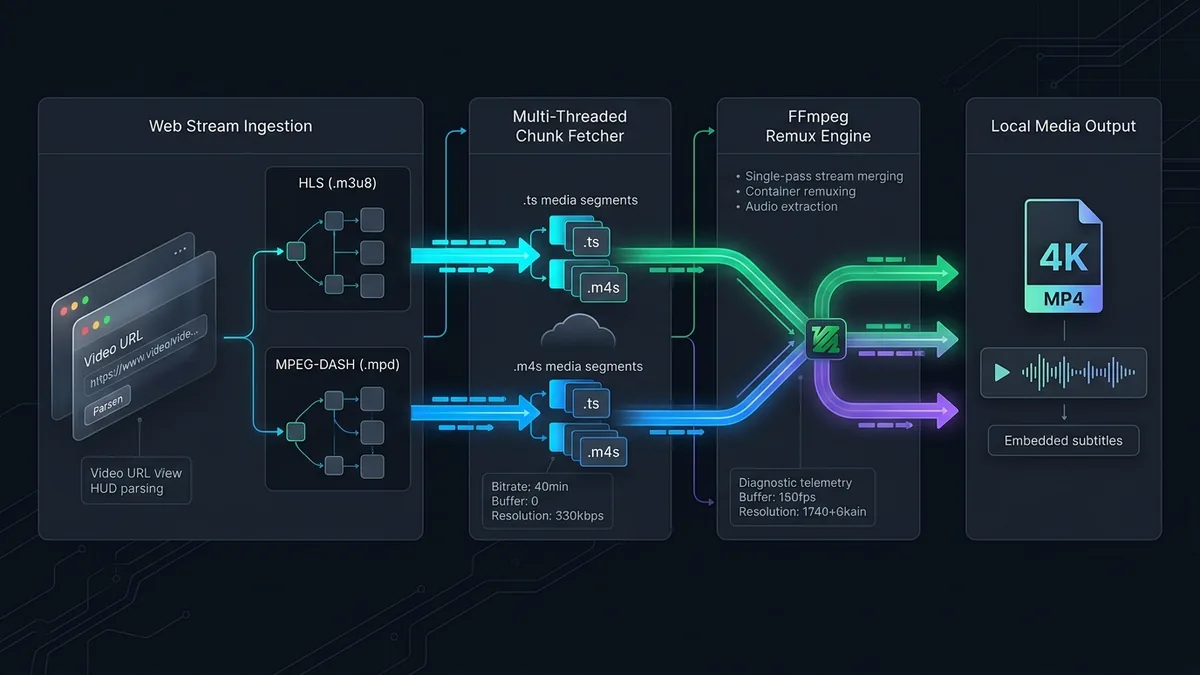
Phase 1: Manifest Parsing & Multi-Threaded Chunk Fetching
Modern video platforms rarely host a single .mp4 file; instead, they split video and audio into separate Adaptive Bitrate (ABR) streams using HLS (.m3u8) or MPEG-DASH (.mpd) manifests. Allavsoft inspects the target URL, identifies the highest available resolution stream (up to 4K/8K VP9 or AV1), and downloads the segmented .ts or .m4s chunks across multiple concurrent threads.
Phase 2: Single-Pass Remuxing & Transcoding
Once the raw video and audio streams arrive on your local disk, Allavsoft invokes its embedded transcoding engine to merge (remux) the streams into a unified container. If you select an alternative output profile—such as extracting 320 kbps MP3 audio or converting WebM footage into H.264 MP4 for Premiere Pro—the conversion occurs automatically in the same workflow.
Key Features & Capabilities
1. Broad Niche Site Compatibility
While dozens of tools focus solely on YouTube, Allavsoft maintains custom parser scripts for hundreds of regional news outlets, academic lecture platforms (Udemy, Coursera public streams), Facebook, Vimeo, Dailymotion, and SoundCloud. When a website updates its player structure and breaks extraction, Allavsoft includes a built-in video recorder as a fallback mechanism.
2. One-Click Batch Playlist & Subtitle Extraction
Pasting a playlist or channel URL prompts Allavsoft to parse every linked video into a checklist queue. Users can simultaneously pull embedded closed captions (.srt or .vtt), retain original file naming conventions, and set concurrency limits to prevent saturating home bandwidth.
3. Direct Audio Extraction & Format Presets
For users building offline music or podcast libraries, Allavsoft strips video tracks on the fly and exports directly to MP3, M4A, WAV, FLAC, AAC, or WMA. It includes over 150 device-specific presets tailored for iPhone, iPad, Android, PlayStation, and legacy media players.
4. Built-in Media Player & Task Automation
An integrated preview player allows inspecting downloaded clips without leaving the software. For multi-hour batch queues, Allavsoft provides post-task triggers to automatically put your Windows PC or Mac to sleep or shut down once all conversions finish.
Comparison: Allavsoft vs. 4K Video Downloader Plus vs. yt-dlp
| Feature / Metric | Allavsoft | 4K Video Downloader Plus | yt-dlp (Open Source) |
|---|---|---|---|
| Free Version Limit | 5 Videos (5-min conversion cap) | 10 Downloads / Day (Unlimited length) | Unlimited |
| Built-in Format Converter | Yes (150+ Video/Audio formats) | Basic (MP4, MKV, MP3, M4A, OGG) | Requires manual FFmpeg flags |
| Supported Platforms | 1,000+ General & Niche Sites | Major Video Sites (YouTube, Vimeo, Twitch) | 1,800+ Sites (Community updated) |
| Interface & Usability | Dated Legacy GUI (Easy 1-click) | Modern UI with Built-in Browser | Command-Line Terminal (Complex) |
| Update Frequency | Periodic silent patches | Frequent weekly updates | Daily GitHub commits |
| Built-in Screen Recorder | Yes (Fallback capture tool) | No | No |
Editions and pricing
Editions, free-trial limits and prices change and differ by country, and we have not verified them. See the current details on the vendor’s own pricing page, linked at the end of this review.
Best Practices for Reliable Media Downloading
To avoid parser errors or IP rate-limiting when running large batch jobs in Allavsoft, follow these technical guidelines:
- Keep Concurrent Downloads Between 2 and 3: Setting simultaneous downloads too high when pulling large playlists can trigger temporary HTTP 429 (Too Many Requests) blocks from video CDNs.
- Select “Same as Original” to Avoid Re-encoding Loss: Unless you specifically need an legacy format like AVI or WMV for an older device, choose the original stream format to remux the file instantly without generational quality loss or heavy CPU usage.
- Update Parser Rules When Sites Break: Video platforms frequently rotate their API signatures. If a URL fails to parse, run Allavsoft’s internal “Check for Updates” utility before attempting screen capture.
UtilRank Verdict
Allavsoft is no longer the magic bullet for encrypted streaming platforms that it was years ago, and its dated interface overdue for a visual overhaul. However, as a pure 2-in-1 downloader and format converter for non-DRM websites, educational portals, and regional video hosts, it remains remarkably effective. If you want a zero-learning-curve desktop tool that grabs niche web videos and converts them into editing-ready formats in one click, Allavsoft still earns its keep in 2026.
Frequently Asked Questions
Is Allavsoft safe to install and use?
Yes. Provided you download the official installer directly from Allavsoft.com, the software is completely free of malware, adware, and background cryptocurrency miners. Avoid third-party “cracked” license generators, which frequently bundle trojans.
Why does Allavsoft fail on some Spotify or Netflix links in 2026?
Major subscription services now enforce strict Widevine DRM encryption and dynamic account token verification. Because Allavsoft is a stream parser rather than a DRM decryption suite, it cannot directly rip encrypted OTT streams and may require using its manual screen/audio recording fallback.
Can Allavsoft download 4K and 8K videos without losing quality?
Yes, provided the source website actually serves an unencrypted 4K or 8K stream. When you select the “Highest Available” quality preset and keep the native MP4/WebM container, Allavsoft downloads the raw video and audio streams and merges them without re-compressing the pixels.
Does a Windows license key work on macOS?
No. Allavsoft sells separate licenses for Windows (Allavsoft for Windows) and macOS (Allavsoft for Mac). If you switch operating systems, you must contact their support team to request a platform license transfer.
How does Allavsoft compare to free browser extensions?
Most browser extensions are banned from downloading from major video sites by Chrome Web Store policies and cannot merge separate 1080p/4K DASH video and audio streams. As a dedicated desktop application with an embedded FFmpeg engine, Allavsoft handles high-resolution muxing and multi-gigabyte batch queues that crash browser plugins.
Frequently Asked Questions
Is Allavsoft safe to install and use?
Why does Allavsoft fail on some Spotify or Netflix links in 2026?
Can Allavsoft download 4K and 8K videos without losing quality?
Does a Windows license key work on macOS?
How does Allavsoft compare to free browser extensions?
Visit Allavsoft
Explore feature details, downloads, and pricing on the official site.