CloudConvert Review (2026): 200+ Formats, Security & Cloud Limits
A review of CloudConvert based on the vendor's descriptions: browser-based video, audio, CAD and document conversion, privacy claims and free usage limits. Not lab-tested.
CloudConvert
CloudConvert remains the gold standard for browser-based file conversion in 2026, offering zero-install convenience, ISO 27001 data privacy, and 200+ format support.
Pros
- Zero desktop installation required—runs in any browser across Windows, macOS, Linux, Chromebook, iPad, and Android
- Supports over 200 formats across video, audio, CAD (DWG/DXF), vector graphics (EPS/SVG), fonts, and e-books (EPUB/MOBI)
- Clean, ad-free interface backed by strict ISO 27001 German data-privacy standards (never sells or mines uploaded files)
- Exposes granular FFmpeg codec, Constant Rate Factor (CRF), resolution, and audio bitrate controls rare for web tools
- Generous 25 conversion minutes per day for free, plus pay-as-you-go credit packages
Cons
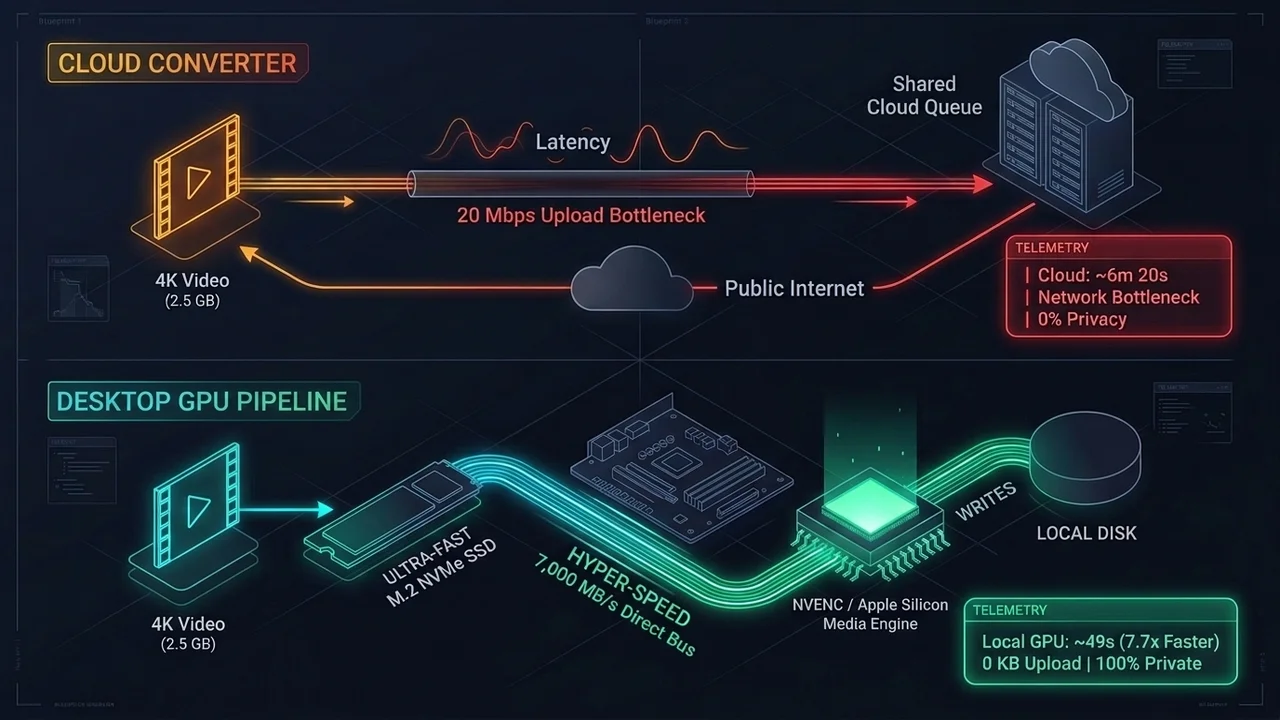
- Upload and download bandwidth bottlenecks make converting multi-gigabyte 4K videos 5x–8x slower than local desktop apps like HandBrake
- Complex high-bitrate 4K transcoding consumes more than 1 conversion credit per minute due to heavy cloud CPU usage
- Requires an active internet connection and uploading files to external AWS/Hetzner cloud servers
CloudConvert remains the gold standard for browser-based file conversion in 2026. Unlike sketchy free web converters plastered with deceptive “Download Now” pop-up ads and arbitrary 50 MB file caps, this German-engineered cloud platform provides an ad-free, ISO 27001-certified environment capable of transcoding everything from 10-bit HEVC videos and lossless FLAC audio to AutoCAD drawings and Kindle e-books.
Use CloudConvert If
- You need to convert files under 200–500 MB quickly without installing software on a Chromebook, iPad, phone, or locked office PC.
- You work with diverse non-video formats including CAD (.dwg), vectors (.ai/.eps), documents (.pages/.pdf), and e-books (.epub).
- You want an ad-free, GDPR and ISO 27001-compliant web tool with granular CRF/bitrate sliders.
- You are a developer looking for a REST API with Google Drive, Dropbox, and AWS S3 webhook integrations.
Skip CloudConvert If
- You are converting multi-gigabyte 4K camera recordings or Blu-ray rips (uploading 5 GB over home internet takes far longer than local GPU encoding in HandBrake).
- You handle sensitive NDA corporate media, medical records, or private footage that must never leave your local hard drive.
- You want a web video downloader (CloudConvert only converts files you already own; it does not rip YouTube URLs—use 4K Video Downloader Plus instead).
Most online file converters treat users poorly: they hide bitrate controls, inject tracking cookies, and throttle downloads. Operated by Lunaweb GmbH in Munich, Germany, CloudConvert operates on a transparent freemium utility model. This review summarizes what the vendor says about the product and how it compares with alternatives.
How CloudConvert’s Isolated Container Architecture Works
When you select a file from your computer, Google Drive, Dropbox, or OneDrive, CloudConvert executes a three-step isolated cloud workflow:
- TLS 1.3 Ingestion & Ephemeral Container Spawning: Your file uploads directly to an encrypted storage bucket and is assigned to an isolated, single-tenant Docker container running the exact open-source binary required for that format (
FFmpegfor video/audio,ImageMagickfor RAW photos,LibreOfficefor documents, orCalibrefor e-books). - Custom Parameter Execution: Clicking the wrench icon before starting a video job lets you specify the exact video codec (
x264,x265,AV1,VP9), Constant Rate Factor (CRF 18–28), audio bitrate, and trim start/end timestamps. - Automated Deletion: Once you download the finished output, the ephemeral worker container is destroyed and both source and output files are permanently purged from CloudConvert’s servers within 24 hours (or immediately via the manual delete button).
Comparison: CloudConvert vs. HandBrake vs. Wondershare UniConverter
| Feature / Metric | CloudConvert (Web App) | HandBrake (Desktop) | Wondershare UniConverter |
|---|---|---|---|
| Platform | Any Web Browser (Zero Install) | Windows, macOS, Linux | Windows, macOS |
| Supported Format Categories | 200+ (Video, Audio, CAD, Docs, Fonts) | Video & Audio only | Video, Audio & Images |
| Large File Speed (>2 GB) | Slow (Bottlenecked by internet upload) | Fast (Direct NVMe + Local GPU) | Fast (Instant lossless remux) |
| Offline Privacy | No (Requires cloud upload) | Yes (100% Local Offline) | Yes (100% Local Offline) |
UtilRank Verdict
CloudConvert is the safest, cleanest, and most capable browser-based converter on the internet in 2026. Whenever you need to convert documents, vectors, audio tracks, or short video clips under 300 MB without installing software, its free daily allowance and pay-as-you-go credit packs are a good fit. For multi-gigabyte 4K videos or sensitive offline footage, pair it with a local desktop transcoder like HandBrake.
Visit CloudConvert
Explore feature details, downloads, and pricing on the official site.