
Disk Drill Pro Review (2026): Advanced Camera Recovery, TRIM Limits & Features
A review of CleverFiles Disk Drill Pro based on the vendor's descriptions: Advanced Camera Recovery, byte-to-byte disk imaging and SSD TRIM limits. Not lab-tested.
CleverFiles Disk Drill Pro
CleverFiles Disk Drill Pro 5.5+ is a masterclass in user interface design and forensic versatility. Its inclusion of a free byte-to-byte disk imager, RAID array reconstruction, and dual Windows/macOS licensing makes it a standout value for multi-device households and videographers. However, if you need up to 2 GB of free recovery on macOS or require automated header repair for corrupted JPEG and MP4 files, EaseUS Data Recovery Wizard Pro remains our top-rated overall choice.
Pros
- Single license unlocks both Windows and macOS editions across up to 3 devices simultaneously
- Advanced Camera Recovery (ACR) module reconstructs fragmented GoPro, DJI drone, and Canon/Sony MP4/MOV video streams
- Built-in byte-to-byte disk imaging creates safe .dmg or .iso clones of failing drives prior to forensic scanning
- Native RAID array (0, 1, 5, 6, 10, JBOD) and Windows Storage Spaces logical reconstruction
- Includes free S.M.A.R.T. disk health monitoring, Recovery Vault metadata protection, and storage cleanup tools
Cons
- Lacks an automated corrupted photo/document header repair engine (unlike EaseUS Data Recovery Wizard Pro)
- Free trial recovers only 100 MB–500 MB on Windows and offers zero free recovery on macOS (preview only)
- Scanning internal macOS system drives on M1–M4 Macs requires booting into Recovery Mode to load kernel extensions (KEXT)
CleverFiles Disk Drill Pro has evolved from a macOS-first utility into one of the most polished cross-platform data recovery suites in 2026. Combining a sleek, dark-mode-native dashboard with forensic features like byte-to-byte disk imaging, RAID reconstruction, and fragmented action-camera video carving, it caters equally to home users and creative professionals—though the absence of an automated file-header repair tool keeps it just behind EaseUS in post-recovery media restoration.
Buy Disk Drill Pro If
- You work across both Windows PCs and Macs and want a single license that covers up to 3 computers.
- You need to create a safe byte-by-byte disk image of a dying, unstable drive before running an intensive sector scan.
- You shoot on GoPro, DJI drones, or mirrorless cameras and need the Advanced Camera Recovery (ACR) module for fragmented video chunks.
- You need to reconstruct broken software RAID arrays or Windows Storage Spaces pools.
Skip Disk Drill If
- Your recovered JPEG photos or MP4 videos have corrupted headers and require automated in-app file repair (EaseUS Data Recovery Pro is better suited here).
- You want to recover 1–2 GB of data on macOS for free without paying upfront (Disk Drill for Mac is strictly preview-only in the free version).
- Your internal SSD has already executed hardware OS TRIM commands hours ago, zeroing out the underlying NAND flash cells.
When a drive partition turns RAW or an SD card is accidentally formatted on set, choosing the wrong recovery tool can mean the difference between a clean restoration and a collection of unplayable file fragments. Developed by CleverFiles, Disk Drill Pro 5.5+ emphasizes proactive data protection alongside deep sector carving. This review summarizes what the vendor says about the product and how it compares with alternatives.
How Disk Drill’s Universal Scanning Architecture Works
Rather than forcing users to choose between quick or deep scan modes manually, Disk Drill’s “Search for Lost Data” button executes four sequential algorithms in a single unified pass:
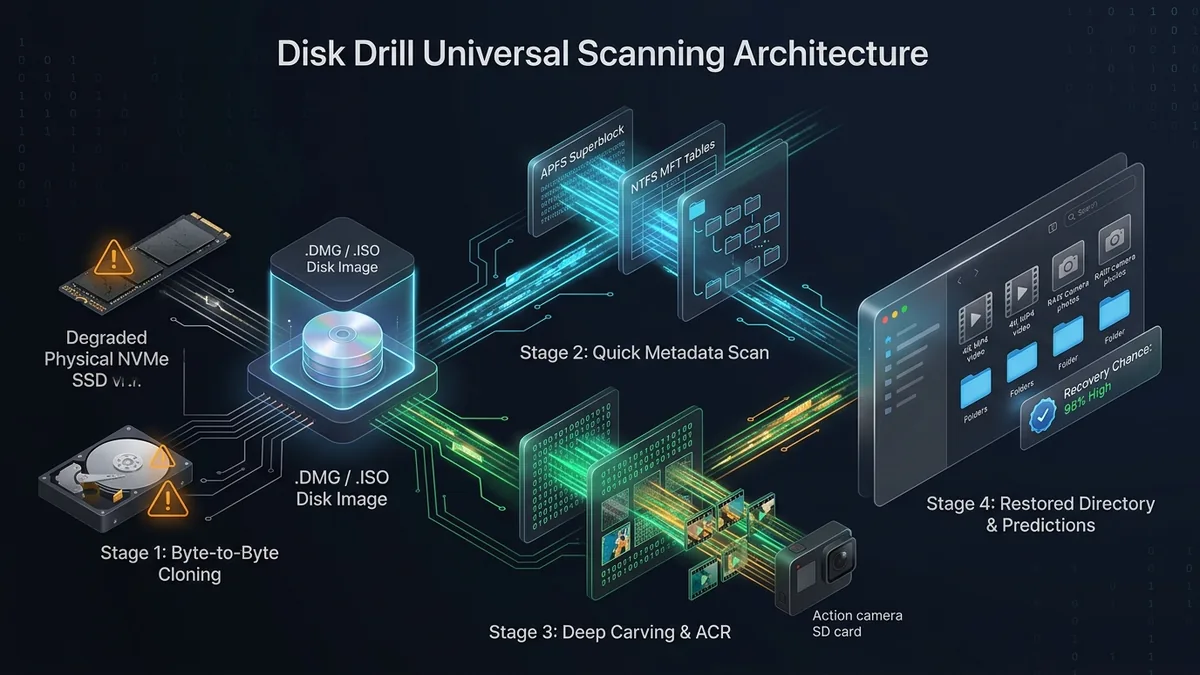
Stage 1: Quick Scan & Lost Partition Reconstruction
Disk Drill first queries existing file system tables (NTFS MFT, APFS Container Superblocks, HFS+ Catalog, FAT32/exFAT directories) and backup boot sectors. If a partition was accidentally deleted or quick-formatted, it rebuilds the virtual directory tree within seconds while retaining original filenames and folder hierarchies.
Stage 2: Deep Signature Carving & Advanced Camera Recovery (ACR)
For severely corrupted or overwritten drives, the Deep Scan engine reads raw 512-byte/4K sectors looking for over 400 binary file signatures. Crucially, modern action cameras (GoPro, DJI, Insta360) split video streams into interleaved metadata and audio/video chunks across non-contiguous sectors. Disk Drill’s ACR module identifies these orphaned MP4/MOV fragments and stitches them back into playable video streams.
Key Features & Capabilities
1. Integrated Byte-to-Byte Disk Imaging
Scanning a physically degraded hard drive with bad sectors directly can stress the read/write heads until the drive dies completely. Disk Drill includes a forensic-grade Byte-to-Byte Backup tool that clones the unstable drive into a clean .dmg or .iso image file, skipping damaged blocks on the first pass and retrying them gently—allowing you to run deep scans safely against the virtual image.
2. Recovery Chance Predictions & Hex Viewer
Once a scan finishes, Disk Drill calculates a real-time Recovery Chance rating (High, Average, or Low) for every orphaned file based on whether contiguous zero-filled or overwritten sectors were detected nearby. Advanced users can inspect the raw hexadecimal header of any file using the built-in Hex Viewer before exporting.
3. Proactive Recovery Vault & S.M.A.R.T. Monitoring
Even without purchasing a Pro license, Disk Drill’s background service monitors internal drive temperatures and S.M.A.R.T. failure attributes. Enabling the Recovery Vault acts as an enhanced metadata layer over the Recycle Bin/Trash, caching exact cluster pointers of deleted files so they can be restored instantaneously with 100% path accuracy.
Comparison: Disk Drill Pro vs. EaseUS Pro vs. Recuva
| Feature / Metric | CleverFiles Disk Drill Pro | EaseUS Data Recovery Pro | CCleaner Recuva (Free) |
|---|---|---|---|
| Cross-Platform License | Yes (1 Key = Windows + Mac, 3 PCs) | No (Sold separately per OS) | Windows only |
| Free Version Quota | 100–500 MB (Windows) / 0 MB (Mac) | 2 GB (Windows & Mac) | Unlimited |
| Corrupted Photo/Video Repair | No (ACR stitches, does not repair headers) | Yes (Built-in header repair engine) | No |
| Byte-to-Byte Disk Imaging | Yes (Included in Free & Pro) | No (Requires separate Partition Master) | No |
| RAID & Storage Spaces Support | Yes (RAID 0/1/5/6/10 & Storage Spaces) | Pro / Technician tiers | No |
Editions and pricing
Editions, free-trial limits and prices change and differ by country, and we have not verified them. See the current details on the vendor’s own pricing page, linked at the end of this review.
Best Practices for Using Disk Drill Safely
- Always Image Failing Drives First: If an external hard drive takes minutes to mount or freezes Windows Explorer, do not run a direct scan. Open Disk Drill’s Drive Backup tab, create a byte-to-byte image on a healthy disk, and scan the mounted image file.
- Verify Previews Before Exporting: A file listed in the scan results is not guaranteed to be intact. Always click the eye icon to render the full photo or play the video preview to confirm its clusters were not overwritten.
- Never Export to the Source Partition: Always point your recovery destination folder to a separate physical drive to avoid overwriting remaining unallocated sectors.
UtilRank Verdict
CleverFiles Disk Drill Pro 5.5+ is a masterclass in user interface design and forensic versatility. Its inclusion of a free byte-to-byte disk imager, RAID array reconstruction, and dual Windows/macOS licensing makes it a standout value for multi-device households and videographers. However, if you need up to 2 GB of free recovery on macOS or require automated header repair for corrupted JPEG and MP4 files, EaseUS Data Recovery Wizard Pro remains our top-rated overall choice.
Frequently Asked Questions
Is Disk Drill really free to use?
Disk Drill Basic is free to download, scan drives, preview recoverable files, and create byte-level disk backups. On Windows, it allows recovering up to 100 MB–500 MB of data for free. On macOS, the free version acts strictly as a diagnostic preview tool—you must purchase a Pro license to export found files.
Does one Disk Drill Pro license work on both Windows and Mac?
Yes. Unlike most competitors that charge separately for Windows and macOS editions, a single Disk Drill Pro license grants you activation keys for both operating systems and allows installation on up to 3 computers simultaneously.
Why did Disk Drill find thousands of unnamed .swf, .plist, or .txt files?
During a Deep Signature Scan, Disk Drill carves raw storage sectors without relying on the partition’s directory table. Because raw sectors do not store filenames, recovered items are organized by file extension and size. Use the top filter bar to narrow results by minimum file size or preview thumbnails to locate your target media quickly.
Can Disk Drill recover files from an iPhone or Android device?
On macOS, Disk Drill can scan iPhones and iPads (via encrypted/unencrypted iTunes local backups and logical extraction) as well as rooted Android devices. However, because modern smartphones use hardware-backed file-based encryption (FBE) with immediate TRIM, recovery is largely limited to logical backup databases (contacts, messages, notes, and cached media).
Frequently Asked Questions
Is Disk Drill really free to use?
Does one Disk Drill Pro license work on both Windows and Mac?
Why did Disk Drill find thousands of unnamed .swf, .plist, or .txt files?
Can Disk Drill recover files from an iPhone or Android device?
Visit CleverFiles Disk Drill Pro
Explore feature details, downloads, and pricing on the official site.