
ExitLag Review (2026): 4-Path Multi-Internet Routing, Features & Verdict
A review of ExitLag v5 based on the vendor's descriptions: 4-path packet routing, Multi-Internet failover and FPS Boost tweaks. Not lab-tested.
ExitLag
For pure Windows PC esports performance, ExitLag v5 remains the most technically sophisticated GPN on the market. Its 4-path simultaneous routing, visual hop traceroutes, and Multi-Internet ISP bonding give tournament players an undeniable safety net against internet blackouts. However, if you also play on PlayStation 5, Xbox, or Nintendo Switch—or if you want a lighter set-and-forget booster—GearUP Booster is the smarter all-around buy in 2026.
Pros
- Industry-leading Multipath engine routes packets across up to 4 simultaneous UDP and 4 TCP tunnels for bulletproof stability
- Granular manual route control allows networking enthusiasts to stack custom entry/exit hops and view live route trace graphs
- Multi-Internet failover seamlessly combines two separate connections (e.g., Fiber + 5G USB tethering) to prevent disconnects
- Built-in FPS Boost module provides safe, toggleable Windows 11 thread priority and power-throttling optimizations
- Massive global backbone covering over 1,000 dedicated bare-metal routing servers and 2,000+ competitive PC titles
Cons
- No native support for home gaming consoles (PlayStation 5, Xbox Series X/S, or Nintendo Switch—unlike GearUP Booster)
- Higher memory footprint (~85–110 MB RAM) and slightly steeper interface complexity for casual plug-and-play users
ExitLag remains the heavyweight champion of competitive PC network optimization in 2026. Trusted by professional esports organizations across Valorant, Counter-Strike 2, League of Legends, and World of Warcraft, its proprietary v5 Multipath routing engine can transmit game packets across up to four simultaneous fiber tunnels—offering unmatched granular control for PC purists, even if console gamers and budget-conscious players are better served by GearUP Booster.
Buy ExitLag If
- You are a competitive PC esports player who demands maximum routing redundancy (up to 4 simultaneous UDP/TCP paths).
- You want manual control over specific server node combinations, real-time hop traceroutes, and custom protocol overrides.
- You have two internet connections at home (e.g., Fiber + 5G Hotspot) and want automatic Multi-Internet failover protection during tournaments.
- You want built-in Windows 11 CPU thread priority and power-plan tweaks alongside network routing.
Skip ExitLag If
- You play on PlayStation 5, Xbox Series X/S, or Nintendo Switch (ExitLag has zero console support; use GearUP Booster instead).
- Your local FTTH fiber provider already delivers a rock-solid 5–12 ms ping with 0% packet loss directly to your city's server.
In high-stakes tournament play, a single 200 ms jitter spike or a 2% packet burst during a site execute can cost a match. Because residential Internet Service Providers (ISPs) configure their Border Gateway Protocol (BGP) tables to minimize transit fees rather than hop latency, competitive PC players frequently suffer from erratic evening routing. This review summarizes what the vendor says about the product and how it compares with alternatives.
How ExitLag’s 4-Path Multipath Architecture Works
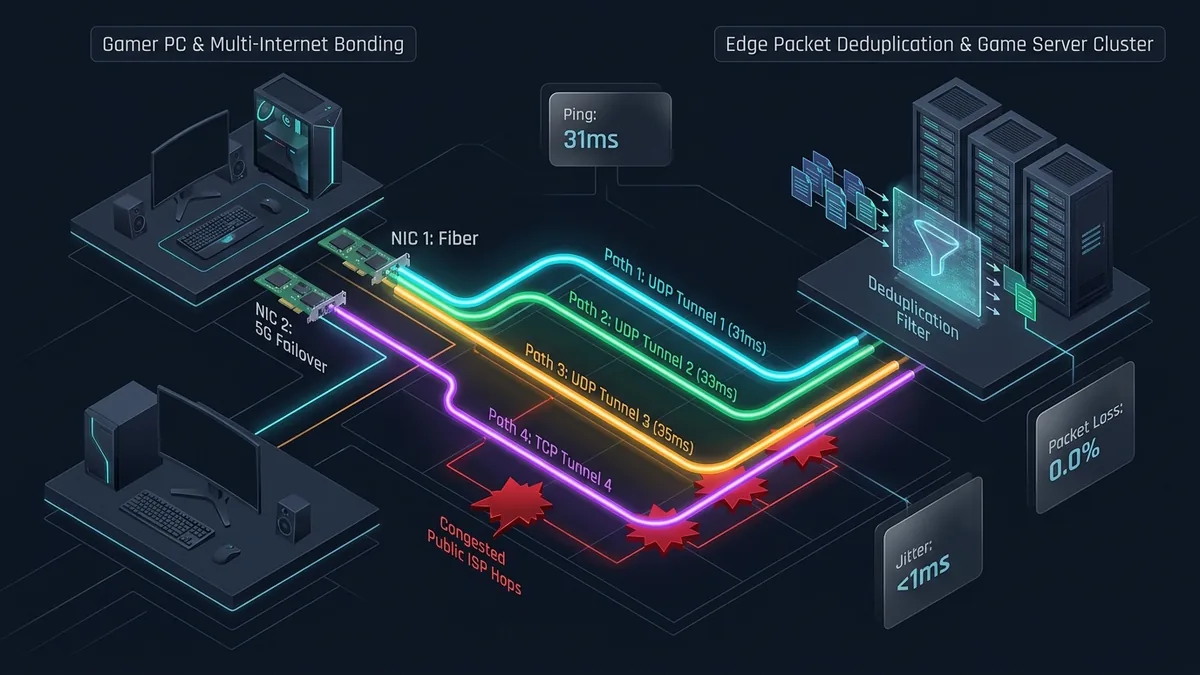
While standard VPNs tunnel your entire operating system through a single encrypted bottleneck, ExitLag v5 operates a kernel-level packet redirector (ExitLagDriver) combined with an AI-driven multi-route mesh:
Phase 1: Real-Time AI Route Probing & Hop Mapping
When you select a game in ExitLag, the software continuously pings over 1,000 global bare-metal proxy servers in the background. It maps out the exact intermediate hops between your home router, ExitLag’s entry nodes, its Tier-1 fiber transit backbone, and the game studio’s data center (AWS, Google Cloud, Riot Direct, or Valve SDR)—displaying a live visual graph of millisecond delays at every hop.
Phase 2: Quad-Route Packet Duplication & Multi-Internet Bonding
Users can configure up to 4 simultaneous UDP routes and 4 TCP routes. ExitLag clones outgoing game packets and dispatches them across separate physical fiber paths. If Route 1 suffers a sudden router queue stall in Frankfurt, Route 2 delivers the identical packet microseconds later, ensuring zero perceived packet loss in-game. Furthermore, its Multi-Internet feature bonds two local network adapters (such as Ethernet Fiber + USB 5G Smartphone Tethering), switching traffic instantaneously if your primary ISP drops out.
Key Features & Capabilities
1. Granular Manual Node & Protocol Tweaking
Unlike simplified one-click boosters, ExitLag lets advanced users override its automatic AI selection. You can manually pick the exact target data center (e.g., EU - Frankfurt 04), define how many backup UDP/TCP routes to keep active, toggle QoS (Quality of Service) packet prioritization headers, and switch between high-compatibility or low-overhead driver hook modes.
2. Integrated FPS Boost & Windows System Tweaks
ExitLag includes a dedicated FPS Boost tab that applies non-destructive operating system optimizations. With simple toggle switches, users can disable Windows 11 Game Bar background DVR recording, prioritize game .exe CPU threads, disable Core Parking on hybrid Intel/AMD processors, and turn off NTFS last-access timestamp writes—without risking unstable BIOS overclocks.
3. Traffic Shaper & Dual-Adapter Failover
For households where multiple people stream 4K Netflix while you game, ExitLag’s Traffic Shaper prioritizes the bound game process on your local network interface card (NIC), minimizing local software bufferbloat before packets leave your PC.
Comparison: ExitLag vs. GearUP Booster vs. LagoFast
| Feature / Metric | ExitLag | GearUP Booster | LagoFast |
|---|---|---|---|
| Max Simultaneous Routes | Up to 4 UDP + 4 TCP Paths | Dual-Tunnel (2 Paths AIR) | Multipath Routing |
| Console Support (PS5/Xbox/Switch) | No (PC & Mobile only) | Yes (PC Share + HYPEREV Box) | Yes (PC Share + Console Box) |
| Multi-Internet Bonding (2 ISPs) | Yes (Native Failover) | Mobile only (Wi-Fi + Cellular) | No |
| Built-in Windows FPS Tweaks | Yes (Safe Registry/Power toggles) | No (Pure network optimizer) | Yes (Includes driver/overclock tools) |
| Target Audience | Hardcore PC Esports & Tinkerers | Multi-Platform & Value Gamers | Casual & Pay-Per-Hour Gamers |
Editions and pricing
Editions, free-trial limits and prices change and differ by country, and we have not verified them. See the current details on the vendor’s own pricing page, linked at the end of this review.
Best Practices for Configuring ExitLag
- Use “2 UDP / 0 TCP” for Modern FPS Titles: Games like Valorant, CS2, Apex Legends, and Overwatch 2 rely almost exclusively on UDP packets for player movement and hit registration. Setting UDP Routes to 2 (and TCP to 0) gives you instant failover redundancy without unnecessary CPU packet-cloning overhead.
- Enable “4 UDP / 2 TCP” Only for MMORPGs or Severe Packet Loss: Titles like World of Warcraft, Final Fantasy XIV, and Lost Ark utilize TCP streams alongside UDP. Reserve 4-path mode for unstable cross-continental connections.
- Keep “Smart Optimization” On Unless Testing Specific Hops: ExitLag v5 dynamically shifts nodes mid-game if an intermediate hop degrades; manual route locking is only necessary if a game’s matchmaking groups players by specific city gateways.
UtilRank Verdict
For pure Windows PC esports performance, ExitLag v5 remains the most technically sophisticated GPN on the market. Its 4-path simultaneous routing, visual hop traceroutes, and Multi-Internet ISP bonding give tournament players an undeniable safety net against internet blackouts. However, if you also play on PlayStation 5, Xbox, or Nintendo Switch—or if you want a lighter set-and-forget booster—GearUP Booster is the smarter all-around buy in 2026.
Frequently Asked Questions
Can ExitLag get you banned in Valorant, CS2, or Call of Duty?
No. ExitLag operates strictly as a Winsock/NDIS virtual network route optimizer and does not inject code into game graphics engines or modify memory addresses. It is officially partnered with and whitelisted by major esports tournament organizers and anti-cheat providers (Vanguard, FACEIT Anti-Cheat, EAC, and BattlEye).
Does ExitLag work on PS5, Xbox Series X, or Nintendo Switch?
No. ExitLag currently supports only Windows PCs, Android, and iOS devices. It does not offer a local PC-to-Console LAN gateway feature. If you want to optimize ping and open strict NAT types on PS5, Xbox, or Switch, we recommend GearUP Booster.
Why does my in-game ping sometimes differ by 2–4 ms from ExitLag’s panel?
ExitLag measures ICMP/UDP round-trip time from your PC to the final edge node inside the game server’s data center. The in-game ping counter often includes server-side tick-rate processing time (typically 2 to 6 ms depending on whether the server runs at 64-tick or 128-tick).
Does ExitLag’s FPS Boost actually increase frame rates?
ExitLag’s FPS Boost will not magically make a budget GPU run like an RTX 4090. However, on mid-range laptops and multitasking PCs, disabling Windows power throttling and prioritizing game CPU threads may improve frame-time stability on some systems; we have not measured this.
Frequently Asked Questions
Can ExitLag get you banned in Valorant, CS2, or Call of Duty?
Does ExitLag work on PS5, Xbox Series X, or Nintendo Switch?
Why does my in-game ping sometimes differ by 2–4 ms from ExitLag's panel?
Does ExitLag's FPS Boost actually increase frame rates?
Visit ExitLag
Explore feature details, downloads, and pricing on the official site.