
GearUP Booster Review (2026): Multi-Path Routing, Features & Limits
A review of GearUP Booster based on the vendor's descriptions: Adaptive Intelligent Routing, console boosting and cross-platform support. Not lab-tested (gear up fortnite).
GearUP Booster
GearUP Booster delivers an exceptional balance of network engineering, lightweight resource usage, and cross-platform versatility. While hardcore PC tinkerers who want granular 4-way node tuning may still gravitate toward ExitLag, GearUP's effortless one-click Adaptive Intelligent Routing, native console NAT optimization, and multi-platform support make it a strong option for competitive gamers in 2026.
Pros
- Adaptive Intelligent Routing (AIR) sends duplicate packets across dual tunnels to eliminate mid-match packet loss spikes
- Native PC-to-Console router sharing and dedicated hardware support (HYPEREV) for PS5, Xbox Series X/S, and Nintendo Switch
- Lightweight driver design, according to the vendor
- Over 7,500 global network nodes supporting 2,500+ PC, console, and mobile titles
- Strict UDP game-traffic isolation leaves Discord, OBS streaming, and browser routing untouched
Cons
- Cannot reduce latency if your local ISP already utilizes an optimal direct BGP peering route to the game server
- No hourly or pay-as-you-go credit model (unlike LagoFast); requires a recurring subscription
- Does not offer deep manual multi-hop node stacking for advanced network engineers compared to ExitLag
GearUP Booster has established itself in 2026 as one of the most versatile Game Private Networks (GPN) on the market, bridging the gap between competitive PC esports and living-room console gaming. By utilizing Adaptive Intelligent Routing (AIR) and dual-tunnel packet duplication, it bypasses congested ISP peering hubs to stabilize jitter and eliminate rubber-banding in latency-sensitive titles like Valorant, Counter-Strike 2, EA Sports FC, and Call of Duty.
Buy GearUP Booster If
- You experience sudden evening ping spikes or packet loss caused by poor ISP BGP routing during peak hours.
- You play across multiple ecosystems (PC, PS5, Xbox, Nintendo Switch, or Mobile) and want a unified cross-platform booster.
- You connect to cross-region servers (e.g., Europe to NA East, or Middle East/Turkey to Frankfurt) and need a direct backbone tunnel.
- You want a zero-configuration, one-click optimizer that runs silently without tanking frame rates.
Skip GPN Software If
- Your local fiber ISP already delivers a stable 5–15 ms ping with 0% packet loss directly to your local game server.
- Your lag is caused by local Wi-Fi interference, a faulty Ethernet cable, or saturated household bandwidth (bufferbloat).
- You only play a few hours a month and prefer a non-expiring hourly credit plan rather than a monthly subscription.
Commercial Disclosure: The promotion link above is a tracked affiliate partnership link. If you purchase a subscription through this link, UtilRank may receive compensation at no additional cost to you.
UTILRANK10 for 10% off at checkout.
Network latency, high jitter, and sudden packet bursts can ruin competitive matches regardless of how powerful your GPU or monitor is. Standard residential Internet Service Providers (ISPs) optimize their Border Gateway Protocol (BGP) routing tables for cost efficiency rather than lowest latency, frequently bouncing game packets through congested regional exchanges. This review summarizes what the vendor says about the product and how it compares with alternatives.
How Adaptive Intelligent Routing (AIR) Works
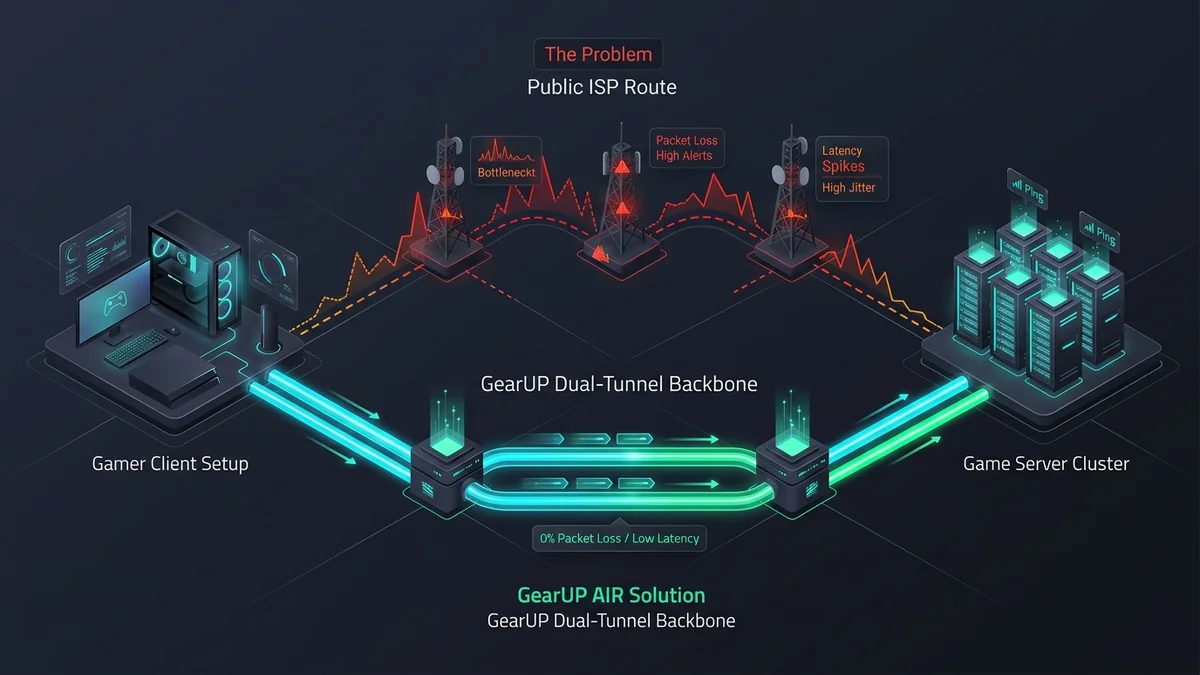
Unlike a traditional consumer VPN—which encrypts all system traffic and routes it through a single distant server, often increasing ping—GearUP Booster operates as a split-tunnel Game Private Network (GPN) divided into two core mechanisms:
Phase 1: Executable-Level UDP Split Tunneling
Instead of hijacking your entire operating system’s network adapter, GearUP hooks exclusively into the target game’s executable process. Only time-critical UDP game packets enter the accelerated tunnel, while Twitch/OBS streams, Discord voice chat, and background downloads continue over your standard ISP connection.
Phase 2: Dual-Path Packet Duplication & Dynamic Failover
GearUP establishes simultaneous primary and secondary routes across its 7,500+ global nodes. If the primary backbone experiences micro-congestion or a dropped hop, the secondary path delivers the mirrored packet within milliseconds, neutralizing in-game rubber-banding before the game client registers a disconnect.
Key Features & Capabilities
1. Cross-Platform PC, Mobile & Console Boosting
Where competitors like ExitLag focus almost exclusively on Windows PCs, GearUP shines in multi-platform environments. Using the PC client’s Game Router mode, your computer acts as a local gateway for your PlayStation 5, Xbox Series X, or Nintendo Switch on the same LAN—fixing strict NAT types (converting NAT Type 3 to Type 2/Open) and stabilizing console matchmaking without requiring an expensive third-party gaming router.
2. Automated Node Selection with Real-Time Telemetry
Upon selecting a game and target region, GearUP automatically probes multiple entry and exit nodes, displaying live telemetry for estimated ping, packet loss percentage, and ISP hop vs. GearUP hop counts. Users can let the algorithm auto-select the fastest path or manually lock a specific regional server (e.g., Frankfurt 02, Tokyo 04, Virginia 01).
3. Zero-Bloatware System Footprint
Many gaming utilities bundle intrusive overlays, cryptocurrency miners, or heavy background services that cause frame-time spikes (1% low FPS drops). The vendor describes GearUP’s background service as lightweight. We have not measured its RAM, CPU or frame-pacing impact.
Comparison: GearUP Booster vs. ExitLag vs. LagoFast
| Feature / Metric | GearUP Booster | ExitLag | LagoFast |
|---|---|---|---|
| Multi-Path Packet Duplication | Yes (Dual-Tunnel AIR) | Yes (Up to 4 simultaneous routes) | Yes (Multipath routing) |
| Console Support (PS5/Xbox/Switch) | Yes (PC Share + HYPEREV Hardware) | No (PC & Mobile only) | Yes (PC Share + Console Box) |
| Supported Games | 2,500+ Titles | 2,000+ Titles | 2,000+ Titles |
| Manual Node Customization | Basic (Region & Server selection) | Advanced (Custom multi-hop control) | Intermediate |
| Free Trial | 3-Day Free Trial | 3-Day Free Trial | Free Trial Available |
Editions and pricing
Editions, free-trial limits and prices change and differ by country, and we have not verified them. See the current details on the vendor’s own pricing page, linked at the end of this review.
Best Practices for Maximizing Network Stability
To get the lowest possible latency when running GearUP Booster, configure your local setup properly:
- Always Use a Wired Ethernet Connection: Wi-Fi 6 and Wi-Fi 6E remain half-duplex radio mediums susceptible to local interference and jitter spikes. A Cat6 Ethernet cable eliminates local 2–15 ms wireless latency spikes before your packets even reach GearUP’s tunnel.
- Match the Booster Region to Your In-Game Server: Always select the exact server city in GearUP (e.g., EU Central - Frankfurt) that matches your in-game matchmaking region to prevent unnecessary trombone routing.
- Disable Conflicting VPNs or Proxy Adapters: Never run NordVPN, Cloudflare WARP, or corporate proxies simultaneously with GearUP, as overlapping virtual TAP/TUN network adapters will double-encapsulate packets and increase ping.
UtilRank Verdict
GearUP Booster delivers an exceptional balance of network engineering, lightweight resource usage, and cross-platform versatility. While hardcore PC tinkerers who want granular 4-way node tuning may still gravitate toward ExitLag, GearUP’s effortless one-click Adaptive Intelligent Routing, native console NAT optimization, and multi-platform support make it a strong option for competitive gamers in 2026.
Frequently Asked Questions
Can GearUP Booster get my gaming account banned?
No. GearUP Booster does not modify game memory, alter system files, or mask your identity to bypass regional store pricing. It operates strictly as a virtual network routing optimizer (similar to a dedicated fast lane for UDP packets) and is whitelisted by major anti-cheat systems including Riot Vanguard, Easy Anti-Cheat (EAC), BattlEye, and Ricochet.
Why did my ping stay the same after turning on GearUP Booster?
If your ping remains identical, your Internet Service Provider already routes your traffic along the shortest physical fiber path to that specific game server. In this scenario, GearUP still provides background failover protection against sudden packet loss and jitter spikes during peak hours.
How does GearUP boost PlayStation 5, Xbox, and Nintendo Switch?
When you launch the Console mode inside the GearUP PC app, it creates a local proxy gateway on your home network. By entering the displayed IP and gateway settings into your console’s network menu, your console’s traffic is routed directly through GearUP’s high-speed backbone, reducing ping and opening strict NAT types.
What is the difference between GearUP Booster and a standard VPN?
A standard VPN encrypts 100% of your computer’s internet traffic for privacy, routing everything through a single server that often adds 20–50 ms of latency. GearUP Booster only routes specific game UDP packets without heavy encryption overhead, using dual-path gaming nodes specifically engineered for minimum latency.
Does GearUP Booster increase FPS in games?
GearUP Booster is a network routing tool, not a graphics overclocker. It will not increase your raw GPU frame rate. However, by eliminating network micro-stutters, packet bursts, and server desynchronization (rubber-banding), gameplay feels significantly smoother and more responsive.
Use verified promo code UTILRANK10 at checkout for 10% instant discount.
Frequently Asked Questions
Can GearUP Booster get my gaming account banned?
Why did my ping stay the same after turning on GearUP Booster?
How does GearUP boost PlayStation 5, Xbox, and Nintendo Switch?
What is the difference between GearUP Booster and a standard VPN?
Does GearUP Booster increase FPS in games?
Visit GearUP Booster
Explore feature details, downloads, and pricing on the official site.