EaseUS Data Recovery Wizard vs. Disk Drill (2026): Forensic Comparison
Head-to-head comparison between EaseUS Data Recovery Wizard Pro and CleverFiles Disk Drill Pro. Research-based, not lab-tested.
When a hard drive partition turns RAW or an SD card is accidentally formatted, two heavyweights dominate the desktop data recovery industry in 2026: EaseUS Data Recovery Wizard Pro and CleverFiles Disk Drill Pro. Both suites combine fast file-system index parsing with deep hexadecimal sector carving, yet they differ sharply in corrupted media repair, free recovery quotas, and cross-platform licensing.
This comparison summarizes what the vendors state about EaseUS Data Recovery Wizard Pro and Disk Drill Pro, and what our reviews of each say. We did not run recovery tests ourselves, so there are no recovery-rate numbers here.
Choose EaseUS Data Recovery Pro If:
- Your recovered MP4/MOV videos or JPEG/RAW photos are unplayable and need automated header and byte-stream repair.
- You want up to 2 GB of free data recovery (on both Windows and macOS) to verify results before buying a license.
- You need a WinPE bootable USB creator to rescue files from an unbootable Windows 11/10 PC.
- You want the highest raw signature database (1,000+ file formats) with 1-on-1 remote specialist support.
Choose Disk Drill Pro If:
- You own both a Windows PC and a Mac and want 1 license key that unlocks up to 3 computers across both OS platforms.
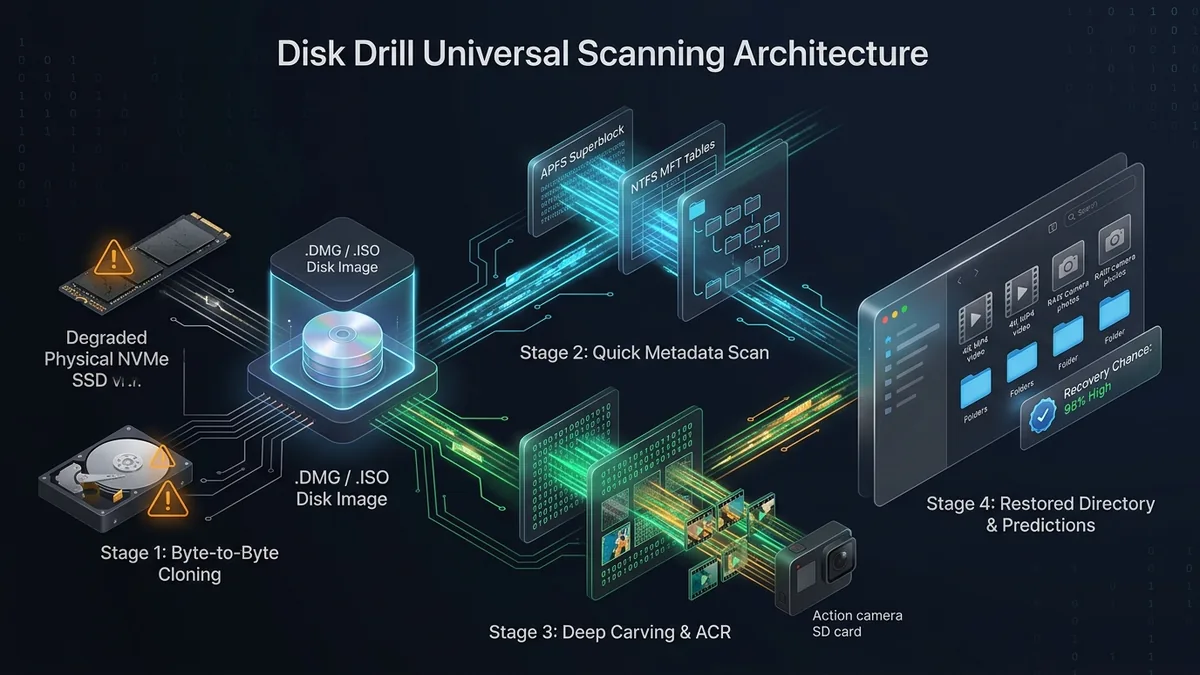
- Your drive is physically failing with bad sectors and you need a built-in Byte-to-Byte (.dmg/.iso) disk imaging backup tool.
- You need to reconstruct broken software RAID arrays (RAID 0/1/5/6/10) or Windows Storage Spaces pools.
- You prefer a licence model without monthly subscription auto-renewals (check each vendor's current options).
Head-to-Head Specification & Forensic Matrix
| Feature / Evaluation Metric | EaseUS Data Recovery Wizard Pro | CleverFiles Disk Drill Pro | Category Winner |
|---|---|---|---|
| Cross-OS License Activation | 1 OS per license (Win or Mac) | Dual OS (Windows + Mac on 3 PCs) | Disk Drill Pro |
| Free Version Recovery Quota | 2 GB Free (Windows & macOS) | 100–500 MB (Windows) / 0 MB (Mac) | EaseUS (Far more generous) |
| RAW Signature Database | 1,000+ File Signatures | 400+ File Signatures | EaseUS Data Recovery Pro |
| Corrupted Photo/Video Repair | Yes (Built-in header repair engine) | No (Stitches chunks, no header fix) | EaseUS Data Recovery Pro |
| Byte-to-Byte Disk Imaging | No (Requires separate Partition tool) | Yes (Included in Free & Pro) | Disk Drill Pro |
| Bootable WinPE USB Creator | Yes (Windows & Mac boot media) | macOS Recovery Mode only | EaseUS Data Recovery Pro |
1. The Decisive Difference: Corrupted File Header Repair
Finding a deleted file in a scan list is only half the battle—the file must actually open without errors. When a large MP4 video, Canon CR3 RAW photo, or Word document is deleted and partially fragmented, its hexadecimal header (moov atom or EXIF block) often detaches from the payload.
- EaseUS Data Recovery Wizard Pro integrates an automated Media & Document Repair Engine. When you preview or export a damaged MP4, MOV, JPEG, or DOCX file, EaseUS automatically realigns the byte stream and rebuilds missing header markers—turning unplayable files into working media.
- Disk Drill Pro includes an impressive Advanced Camera Recovery (ACR) scanner that stitches scattered GoPro/DJI video chunks together, but it does not include a file-header repair module for corrupted JPEGs, PNGs, or Office documents.
2. Disk Imaging vs. Bootable Crash Recovery
Each tool offers one critical forensic utility that the other lacks:
- Why Disk Drill Wins on Dying Drives: If an old mechanical hard drive is freezing Explorer due to bad sectors, Disk Drill’s free Byte-to-Byte Backup feature lets you clone the drive into a
.dmgor.isoimage file first, so you can scan the clone without killing the physical drive. - Why EaseUS Wins on Dead Windows PCs: If your Windows 11 PC suffers a Blue Screen of Death (BSOD) and refuses to boot, Disk Drill for Windows has no bootable USB creator. EaseUS Pro lets you build a WinPE Bootable USB stick in three clicks, booting directly into a pre-installation recovery graphical interface to rescue your desktop files.
Final Verdict: Which Data Recovery Suite Should You Choose?
- Best fit for Photo/Video Repair: EaseUS Data Recovery Wizard Pro
With a 2 GB free recovery allowance (even on macOS), a massive 1,000+ file signature database, built-in WinPE bootable media creation, and automated corrupted MP4/JPEG header repair, EaseUS is the stronger choice according to the vendors’ feature lists. We have not measured recovery results. - Best for Multi-OS Households & Failing Disk Cloning: CleverFiles Disk Drill Pro
If you want one licence that covers both your Windows desktop and MacBook (check the current licence terms)—or if you need to image a failing drive before scanning—Disk Drill Pro is a strong alternative.
Disclosure
Some outbound links on this page may be affiliate links. If you buy through them, UtilRank may earn a commission at no extra cost to you. Commissions do not influence which tools are included or how they are described. Read our affiliate disclosure and editorial policy.
Sources and verification
The tool descriptions come from the UtilRank reviews below, which in turn use the vendors’ own descriptions.
Looking for in-depth evaluations of the tools mentioned in this guide? Check out our hands-on reviews: