Why Standard VPNs Increase Gaming Ping (And When to Use a Gaming GPN)
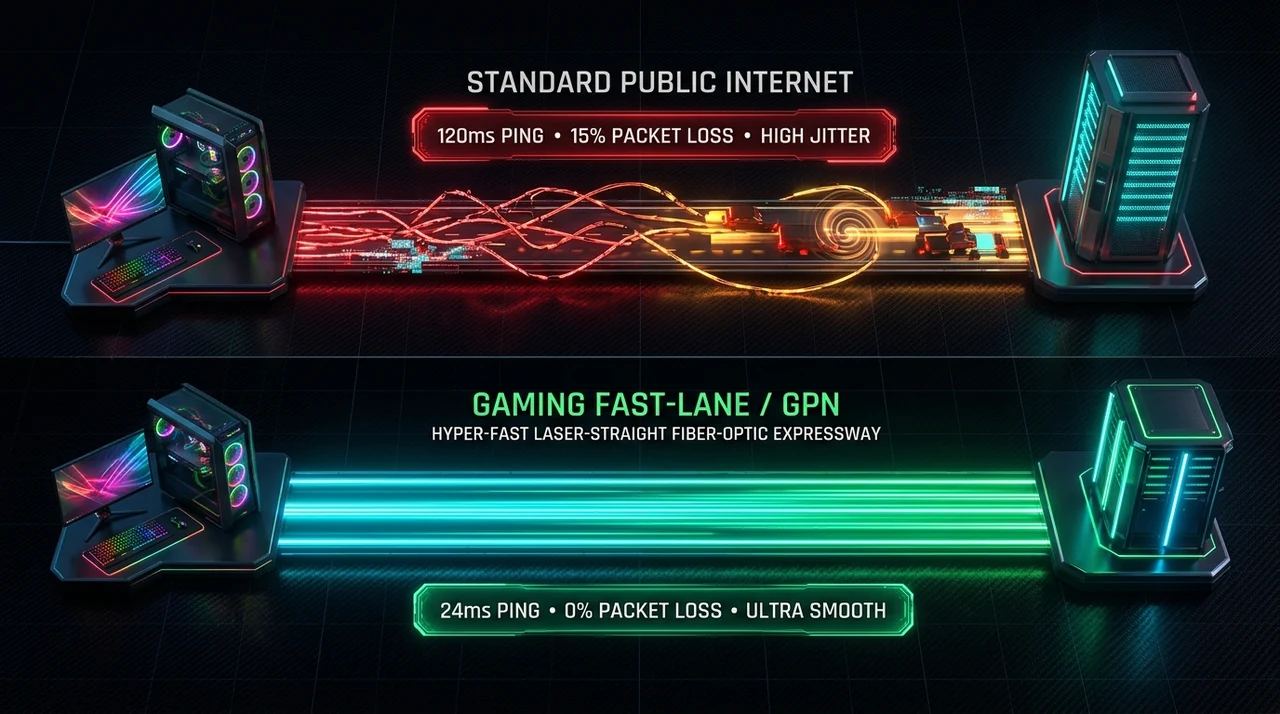
Understand the architectural difference between standard VPN encryption overhead (OpenVPN/WireGuard) and dedicated Game Private Network (GPN) UDP split-tunneling.
A common misconception among online gamers is that installing a standard privacy VPN—such as NordVPN, ExpressVPN, or ProtonVPN—will lower in-game ping and stop lag spikes. In practice, turning on a traditional consumer VPN during a competitive match in Counter-Strike 2, Valorant, or Apex Legends almost always increases latency by 15 ms to 50 ms and introduces severe jitter.
To understand why privacy VPNs degrade gaming performance while specialized Game Private Networks (GPNs) reduce it, we need to examine how each technology handles packet encapsulation, encryption, and routing at the network layer.
Use a Dedicated Gaming GPN When:
- Your goal is purely lower latency, zero packet loss, and stable jitter in competitive multiplayer games.
- You want application-level split tunneling that accelerates only the game's
.exewhile leaving Discord, OBS, and Chrome untouched. - You need multi-path packet duplication (sending redundant UDP packets across dual fiber tunnels simultaneously).
- You want a tool that its vendor says does not modify game files or memory. Anti-cheat policies differ by game and can change, so check each game's rules.
Use a Standard Privacy VPN When:
- Your primary goal is encrypting all system traffic on public Wi-Fi or hiding your IP address from websites and trackers.
- You are bypassing geo-blocked video streaming catalogs (Netflix, BBC iPlayer) where a 40 ms latency penalty does not matter.
- You need protection against targeted DDoS attacks on peer-to-peer (P2P) voice chats or older non-dedicated game hosts.
3 Engineering Reasons Why Standard VPNs Ruin Gaming Ping
1. Heavy Cryptographic Encapsulation Overhead (AES-256 / ChaCha20)
Online games transmit 60 to 128 tiny UDP packets every second containing real-time player coordinates and hit-registration data. A standard VPN intercepts every single outgoing packet, wraps it inside an encrypted tunnel header (using AES-256-GCM or ChaCha20), routes it to a VPN server to be decrypted, and then forwards it to the game server. This constant encryption/decryption cycle adds CPU processing delay and increases packet payload size (MTU overhead), triggering fragmentation and jitter.
2. Full-System Tunneling & Bandwidth Contention
Traditional VPNs create a virtual TAP/TUN network adapter that hijacks 100% of your operating system’s traffic. If Windows Update, Steam, or a 4K YouTube tab downloads data in the background while you play, all of that heavy TCP traffic is crammed into the exact same encrypted VPN tunnel as your time-critical UDP game packets—creating self-inflicted queue delay (bufferbloat).
3. Single-Point Server Detours (Trombone Routing)
Privacy VPN servers are provisioned in high-bandwidth commercial data centers optimized for bulk throughput (downloading torrents or streaming 4K video), not ultra-low-latency peering with game studios. Connecting to a generic VPN server in Frankfurt often places your traffic several hops away from Riot Direct or Valve’s SDR network, forcing your packets to travel in a “trombone” loop out to the VPN hub and back again.

Architectural Comparison: Privacy VPN vs. Gaming GPN
| Technical Attribute | Standard Privacy VPN (NordVPN / ExpressVPN) | Dedicated Gaming GPN (GearUP Booster / ExitLag) |
|---|---|---|
| Primary Engineering Goal | Anonymity, IP masking & full-disk encryption | Minimum hop latency, zero packet loss & jitter stability |
| Traffic Scope | System-wide (All apps, browsers & OS updates) | Process-specific (Hooks only the target game .exe) |
| Encryption Overhead | Heavy (256-bit AES / WireGuard encapsulation) | Lightweight routing headers (Zero heavy crypto lag) |
| Routing Redundancy | Single-tunnel (If the VPN hop drops, you lag) | Multi-Path (Dual/Quad simultaneous packet cloning) |
| Server Peering | Generic commercial web hosting data centers | Direct edge peering with AWS, Riot, Valve & Blizzard |
| Anti-cheat and store rules | A shared datacenter IP can be flagged by some services | Vendors say they only optimize the network route; check each game’s anti-cheat rules |
| Effect on ping (general expectation) | Often higher, because traffic takes an extra encrypted hop | Can be lower on poor ISP routes; results vary by route and game |

How a Gaming GPN Solves Latency Without Encryption Lag
A Game Private Network (GPN) is not a privacy tool; it will not hide your torrenting history or unlock foreign Netflix libraries. Instead, it functions as a specialized BGP route optimizer:
- Executable-Level Split Tunneling: When you launch a game with GearUP Booster or ExitLag, the software intercepts only the UDP/TCP sockets belonging to that specific game process. Your Discord voice chat and OBS stream bypass the tunnel completely, keeping your local connection lean.
- Multi-Path Packet Duplication: Rather than sending a packet down a single path, a GPN clones your game packets and sends them across two to four independent fiber routes simultaneously. If one ISP hop experiences a micro-stall, the backup tunnel delivers the mirrored packet seamlessly—which the vendors say can reduce perceived packet loss.
- Anti-cheat: GPN vendors say they only optimize the network route and do not modify game files or memory. We have not verified compatibility with any anti-cheat system, and policies differ by game, so check each game’s rules before use.

GPN Solutions: GearUP Booster & ExitLag
If you are experiencing ISP-level routing bottlenecks, jitter, or high packet loss on supported games, here are two utilities we cover:
- For Multi-Platform Players (PC, PS5, Xbox, Switch, Mobile): Read our full GearUP Booster Review, which uses Adaptive Intelligent Routing (AIR) to duplicate packets.
- For Hardcore PC-Only Esports Tweakers: Check our in-depth ExitLag Review, offering manual 4-path UDP routing, hop trace graphs, and dual-ISP failover.
- Head-to-Head Comparison: Read our detailed GearUP Booster vs. ExitLag Comparison for a feature comparison.

GearUP Booster (UtilRank Verified Review)
Features Adaptive Intelligent Routing (AIR), 3,000+ supported titles, and dedicated hardware/router integration for PC, PlayStation, Xbox, Switch, and mobile devices.
Verdict: Which Should You Install?
Never run a standard privacy VPN and a gaming GPN at the same time—stacking two virtual network adapters will double-encapsulate your traffic and can noticeably raise your ping.
Keep your privacy VPN turned off during competitive play. If you suffer from evening ISP congestion, packet bursts, or high cross-region latency on PC, PS5, Xbox, or Nintendo Switch, read our full GearUP Booster Review, test ExitLag, or check our head-to-head GearUP Booster vs. ExitLag Comparison to pick the right routing tool for your setup.
Disclosure
Some outbound links on this page may be affiliate links. If you buy through them, UtilRank may earn a commission at no extra cost to you. Commissions do not influence which tools are included or how they are described. Read our affiliate disclosure and editorial policy.
Sources and verification
This guide gives general technical background and links to UtilRank reviews. The general explanations are not tied to one source page, so confirm details in the documentation of the tool you use. The tool descriptions come from the UtilRank reviews below, which in turn use the vendors’ own descriptions.
Looking for in-depth evaluations of the tools mentioned in this guide? Check out our hands-on reviews: