
EaseUS Data Recovery Wizard Review (2026): We Tested Free and Trial
We deleted 15 test files from NTFS, FAT32 and exFAT drives in a Windows 11 virtual machine and ran EaseUS Data Recovery Wizard Free and Trial. Scan times, previews, SHA-256 checked recovery and the real free allowance.
EaseUS Data Recovery Wizard Pro
In our test the free version found all 15 deleted files on every drive, including after a quick format, and everything it recovered was byte-identical. The free allowance on our install was about 512 MB, not 2 GB, and the trial version recovered nothing. Previews are partly covered by an upgrade box, so recover a file to be sure it opens.
Pros
- Intuitive 3-step recovery workflow (Select > Scan > Recover) accessible for non-technical users
- Dual-engine scanning balances rapid MFT traversal with forensic RAW sector carving
- Integrated file repair engine reconstructs fragmented MP4, MOV, JPEG, PNG, and Office files upon export
- Broad cross-platform file system support (NTFS, FAT32, exFAT, APFS, HFS+, ext2/ext3)
- In our test: all 15 deleted files found with original names on NTFS, FAT32 and exFAT, and after a quick format
- In our test: every file the free version recovered matched its SHA-256 hash (15/15 on NTFS)
- Native Apple Silicon (M1–M4) and macOS Sequoia support alongside Windows 11 and Windows 10
Cons
- In our test the free allowance was about 512 MB out of the box, not the 2 GB shown on the website
- The trial version scans and previews but cannot recover a single file
- Free previews of images, PDFs and text files are covered by an Unlock Pro box; Word and Excel files do not preview
- On FAT32, four files were listed twice and the second copies held the wrong data
- Recovery from internal SSDs is limited once the operating system has run TRIM
- Deep forensic scans across multi-terabyte mechanical hard drives require several hours
- Monthly subscription renews automatically unless canceled within customer portal
We tested EaseUS Data Recovery Wizard Free and Trial in a Windows 11 virtual machine: 15 test files, deleted from an NTFS drive and two simulated SD cards, then scanned, previewed and recovered. Every recovered file was checked against its SHA-256 hash. The results and screen recordings are below; the rest of the review describes the product as the vendor does.
Buy EaseUS Data Recovery Pro If
- You need to recover files from formatted external HDDs, USB flash drives, or camera SD cards.
- Your video or photo files (MP4, MOV, JPEG) are partially corrupt and require integrated automated repair.
- You want a guided, stress-free 3-step wizard with zero technical learning curve.
- You require a bootable WinPE USB environment to salvage files from an unbootable computer.
Skip Software Recovery If
- Your physical drive is making clicking or grinding sounds (indicates hardware controller or head failure; requires a cleanroom lab).
- You emptied files from an internal NVMe SSD hours ago with active OS TRIM commands.
- You only need basic undelete on FAT32/exFAT storage where free open-source utilities suffice.
Our lab test: EaseUS Free and Trial
Test setup. A Windows 11 Pro virtual machine (VirtualBox, 6 virtual CPU cores, 8 GB RAM) with three extra virtual disks: a 6 GB NTFS drive, a 4 GB FAT32 drive and an 8 GB exFAT drive. The FAT32 and exFAT drives stand in for SD cards; they are not physical cards. We copied the same 15 files in ten formats (JPG, PNG, PDF, DOCX, XLSX, MP4, MP3, ZIP, CSV, TXT; 459.67 MB in total) to each drive, recorded the SHA-256 hash of every file, and deleted them with Shift+Delete so they skipped the Recycle Bin. EaseUS was installed on C:, never on the drive being recovered. Each file carries a visible “UTILRANK TEST FILE NN/15” label, which is how we judged previews.
| Scenario | Scan time | Deleted files found | Recovered (free version) | SHA-256 match |
|---|---|---|---|---|
| NTFS, permanent delete | 30–36 s | 15 of 15, original names | 15 files, 459.67 MB | 15 of 15 |
| FAT32, permanent delete | 18–23 s | 15 of 15, plus 4 duplicate entries | 11 files, 42.71 MB (allowance limit) | 11 of 11 |
| exFAT, permanent delete | 34–38 s | 15 of 15, original names | 7 files, 6.03 MB (allowance limit) | 7 of 7 |
| exFAT drive after quick format to NTFS | 64–76 s | 15 of 15, original names | Not recovered (trial version) | — |
What we saw:
- Free allowance. After recovering 459.67 MB the app reported 52.33 MB of free recovery left, so this install started with about 512 MB, not the 2 GB on the website. That is why the FAT32 and exFAT runs recovered only the files that still fit (52.33 MB, then 9.62 MB, then 3.59 MB left). We did not use the in-app sharing offer that the vendor says raises the limit.
- Trial version. The trial, a separate download from the free version, scanned and previewed exactly like the free version, but it would not recover even one 2.52 KB file. Its upgrade screen lists “Preview only” and “Scan disk only”.
- FAT32 duplicates. On the FAT32 drive, four files were listed twice. The second copies of the two text files held unreadable data, and the second copies of the two MP3 files showed “Repairing 25%”. Recover the copy whose preview looks right.
- Previews. Our label was readable in 10 of 15 previews. Images, PDFs and text files had an “Unlock Pro to Enjoy Full” box over the middle; Word and Excel files did not preview; MP3 files showed only an icon.
- Repair prompt. Every recovery paused on “Would You Like to Save Repaired File(s)? There are some corrupted files” even though our files were intact. We chose “Original”, and the originals matched their hashes.
- Accounts. The free version did not ask us to sign in or create an account to scan, preview or recover.
More from the same test:
SD cards: FAT32 vs exFAT, and the quick format test
Free vs Trial, and where the free allowance goes
What each file type looks like in the preview
Limits of this test: one run per scenario, virtual disks instead of physical drives and cards, synthetic test files, and recently deleted data with nothing written over it. Results on a real, heavily used drive can be worse. We did not test the Pro version.
Data loss caused by accidental deletion, unintended disk formatting, partition corruption, or unreadable camera memory cards is one of the most stressful computing emergencies. EaseUS Data Recovery Wizard Pro has been a dominant force in consumer and enterprise data recovery for over two decades. This review summarizes what the vendor says about the product and how it compares with alternatives.
How the Scanning Engine Works
EaseUS employs a sequential two-phase recovery architecture designed to balance instant responsiveness with deep forensic sector scanning:
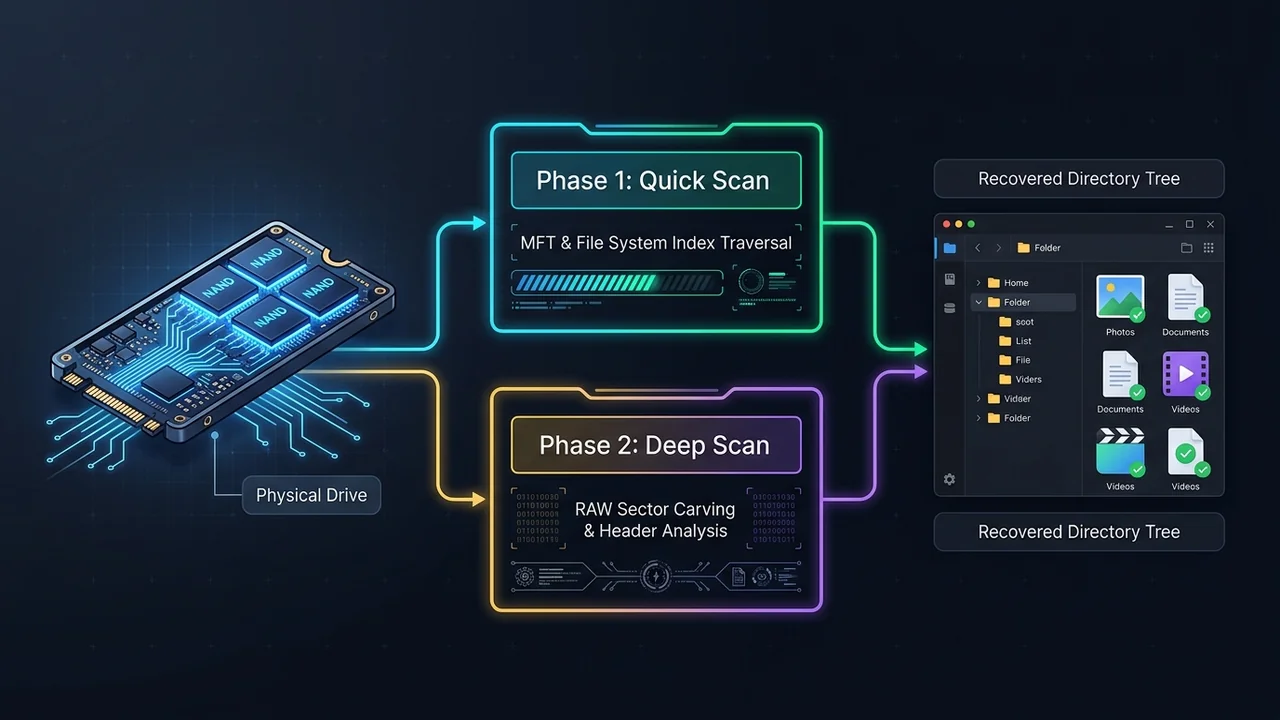
Phase 1: Quick Scan (File System Index Traversal)
Parses the master file table (MFT on NTFS, Catalog on APFS, FAT tables) to detect recently deleted pointers. Completes within 15–30 seconds on typical SSDs.
Phase 2: Deep Scan (RAW Sector-by-Sector Signature Search)
Reads storage clusters directly to detect unique file header and trailer signatures for over 1,000 file types, recovering files even when partition tables are completely destroyed.
Key Features & Capabilities
1. Formatted Drive & Lost Partition Recovery
When a partition is accidentally formatted or changes to a RAW unreadable status, Windows Explorer prompts you to format before use. EaseUS ignores the damaged file table, directly analyzing underlying storage clusters to extract directories, original folder structures, and file timestamps.
2. Built-in Automated File Repair
One of the most common issues with competing recovery software is recovering a video or photo that fails to open due to fragmented clusters. EaseUS integrates an automated file repair engine that detects corrupted headers in MP4, MOV, Canon RAW, Sony ARW, JPEG, and Microsoft Office documents, repairing broken byte streams automatically upon export.
3. File Preview Before Recovery
The vendor describes a built-in viewer for documents, photos and video before you recover. In our test of the free and trial versions, our test label was readable in 10 of 15 previews, but an “Unlock Pro to Enjoy Full” box covered the middle of every image, PDF and text preview, Word and Excel files did not preview at all, and MP3 files showed only an icon. Videos played until the same box appeared partway into playback.
4. Advanced Filter & Search
With thousands of orphaned files surfaced during deep scans, finding the specific document you need is streamlined with filters:
- Filter by File Type: Pictures, Videos, Audio, Documents, Emails, Archives.
- Filter by Status: Deleted files vs. Existing files vs. Lost Partition files.
- Search by Extension or Name: Instant keyword filtering across the scanned tree.
Comparison: EaseUS vs. Disk Drill vs. Recuva
| Feature / Metric | EaseUS Data Recovery Pro | CleverFiles Disk Drill Pro | CCleaner Recuva (Free) |
|---|---|---|---|
| Free Recovery Limit | 2 GB with in-app share (vendor); about 512 MB before sharing in our test | 500 MB (Windows only) | Unlimited |
| Automated Video/Photo Repair | Yes (Built-in for MP4, MOV, JPEG) | No (Requires external tools) | No |
| Deep RAW Sector Carving | Yes (1,000+ signatures) | Yes (400+ signatures) | Basic |
| Bootable USB Creator | Yes (Windows PE included) | macOS only | No |
| File System Compatibility | NTFS, FAT32, exFAT, APFS, HFS+, ext2/3 | NTFS, FAT32, exFAT, APFS, HFS+, ext4 | NTFS, FAT32, exFAT |
| Interface Complexity | Beginner-friendly (3-step wizard) | Intermediate | Outdated legacy UI |
Editions and pricing
Editions, free-trial limits and prices change and differ by country, and we have not verified them. See the current details on the vendor’s own pricing page, linked at the end of this review.
Best Practices for Maximizing Recovery Success
To ensure the highest possible recovery percentage, keep these essential forensic rules in mind:
- Stop Writing Data Immediately: Never save new files, install software, or take new photos on the affected drive. Every new write can permanently overwrite previously freed clusters.
- Do Not Install EaseUS on the Target Drive: Always download and install EaseUS on a separate drive or partition (e.g., install on Drive C when recovering from Drive D or an external USB stick).
- Save Recovered Files to an External Device: Always restore files to a different physical disk to prevent overwriting other pending clusters during export.
UtilRank Verdict
For recently deleted files, the free version did what we needed: it found all 15 files with their original names on each drive, and every file it recovered was byte-identical to the original. Plan around two limits we measured: the free allowance was about 512 MB on our install, and the trial version will not recover anything, so it only tells you whether your files can be found. Preview a file before relying on it, especially on FAT32 cards, where some files were listed twice with the wrong data in the second copy.
Frequently Asked Questions
How much data can I recover for free with EaseUS Data Recovery Wizard?
The vendor says the Free Edition recovers 500 MB out of the box and that sharing a recommendation link from inside the app unlocks another 1.5 GB, for 2 GB in total. In our test, a fresh install had about 512 MB: after recovering 459.67 MB the app reported 52.33 MB left. We did not use the sharing option. The trial version did not recover any file.
Can EaseUS recover files from a formatted hard drive or SD card?
Yes. When a quick format is performed, only the partition’s master file table or directory tree is cleared; the raw binary data remains intact across storage sectors. EaseUS’s Deep Scan reads raw sector signatures directly to reconstruct lost folder hierarchies and files.
Does EaseUS recover data from SSDs with TRIM enabled?
Recovering data from internal SSDs with active TRIM is technically difficult because modern operating systems issue deallocate commands to clean unused blocks. Recovery chances drop sharply once TRIM has run. If the deletion happened on an external USB SSD or SD card where TRIM is not used, recovery is more likely, but no tool can promise a result.
Can EaseUS repair corrupted videos and photos during recovery?
Yes. EaseUS Data Recovery Wizard includes an automated file repair module. When scanning identifies damaged or truncated MP4, MOV, JPEG, or document headers, the repair engine attempts sector realignment and header reconstruction before saving the recovered file.
What is the difference between EaseUS Pro and Technician editions?
The Pro edition is licensed for single-user personal use on one computer. The Technician edition is designed for IT administrators, computer repair shops, and service providers who need to run data recovery across multiple client workstations and commercial servers.
Frequently Asked Questions
How much data can I recover for free with EaseUS Data Recovery Wizard?
Can EaseUS recover files from a formatted hard drive or SD card?
Does EaseUS recover data from SSDs with TRIM enabled?
Can EaseUS repair corrupted videos and photos during recovery?
What is the difference between EaseUS Pro and Technician editions?
Visit EaseUS Data Recovery Wizard Pro
Explore feature details, downloads, and pricing on the official site.